


Click-to-WhatsApp ads stop showing conversions because the sale or lead happens inside a WhatsApp chat, and there’s no webpage there for the Meta Pixel to fire on. By default, Meta Ads Manager only sees the ad click and the chat that started. It can’t tell whether that chat turned into a booking, a qualified lead, or a paid order. To see real conversions, you have to send them back to Meta through the Conversions API for Business Messaging, matched to the ad with the click ID called ctwa_clid.
The good news is that most “zero conversions” problems come from a handful of setup gaps. Once you know which one you have, the fix is usually clear.
Quick Overview
| What you see in Ads Manager | Most likely cause | What to do |
| Link clicks, but no conversions at all | No pixel on a chat, and no Conversions API events being sent | Send Purchase or LeadSubmitted events through the Conversions API with the ctwa_clid |
| Results show, but only as chats | You’re reading the Messaging columns, which count conversations, not sales | Add conversion columns once events flow in, and judge chats as a top-of-funnel metric |
| Fewer conversations than chats in your inbox | Meta’s 7-day rule, returning contacts, or region exclusions | Compare against the metric definition before assuming tracking is broken |
| Conversion columns show a dash or stay blank | Mixed attribution settings, a brand-new ad, or events that never reached the dataset | Check attribution settings and Events Manager |
| No WhatsApp option under the Leads objective | Feature availability varies by account and region | Use Engagement or Sales with WhatsApp as the conversion location |
Why Doesn’t the Meta Pixel Track Click-to-WhatsApp Ads?
The Meta Pixel only works on a webpage, and a Click-to-WhatsApp ad skips the webpage entirely. On a normal website ad, someone clicks, lands on your page, the pixel fires, and Meta records a Lead or Purchase. With a CTWA ad, the tap opens WhatsApp directly. There’s no browser, no cookie, and no page load.
WhatsApp chats are also end-to-end encrypted, so Meta can’t read the conversation to decide on its own whether someone bought something. That’s the core reason the “Purchases” or “Leads” column stays empty even when your team is closing deals all day in chat.
Here’s a simple example. A furniture store spends $500 on a CTWA campaign. Ads Manager shows 210 messaging conversations started. The sales team closes 18 orders in WhatsApp. Unless someone sends those 18 orders back to Meta, Ads Manager will report 210 chats and zero sales, and Meta’s algorithm will keep looking for more people who like to chat, not people who like to buy.
What Does Meta Ads Manager Track by Default for WhatsApp Ads?
Out of the box, Ads Manager tracks delivery and engagement metrics, plus Messaging conversations started. It does not track what happens after the first message.
What you get by default:
- Impressions, reach, CPM, and link clicks
- Messaging conversations started
- Cost per messaging conversation started
- Amount spent
What you don’t get by default:
- Qualified leads
- Bookings or appointments
- Purchases and purchase value
- Return on ad spend (ROAS) for WhatsApp sales
What Counts as a “Messaging Conversation Started”?
Meta counts a conversation as started when someone messages your business for the first time, or after 7 or more days of inactivity, after clicking your ad. WhatsApp’s own guide to measuring campaign performance also makes the key point plainly: someone who starts a chat isn’t necessarily a likely buyer.
This definition explains a lot of “missing” numbers:
- Returning customers inside 7 days don’t count as a new conversation.
- People who tap the ad but never press send don’t count. The chat window opens, but nothing reaches you.
- People who message your number from a saved contact instead of the ad button aren’t tied to the ad.
- Region limits apply. Meta’s help documentation notes that ads delivered to or from Europe or Japan are excluded from this metric.
Important Point to be Considered! If your inbox shows more chats than Ads Manager, that is not always a tracking bug. Check these definitions first. The gap is often expected.
What Are the Most Common Reasons CTWA Conversions Aren’t Showing Up?
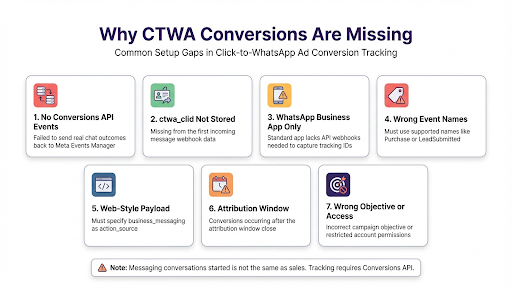
Most cases fall into one of seven buckets. Work through them in order, because the first two cover the majority of accounts.
1. No Conversions API Events Are Being Sent
If nothing sends conversion events from your chat system to Meta, Ads Manager will never show WhatsApp sales. This is the number one cause. There’s no setting to “turn on” WhatsApp purchase tracking. The data has to come from you, your CRM, or your WhatsApp platform provider.
2. The ctwa_clid Isn’t Captured or Stored
Meta’s Conversions API for Business Messaging onboarding guide explains that the ctwa_clid is a unique ID created for each ad click. It arrives in the referral object of the first incoming message webhook when a chat starts from a Click-to-WhatsApp ad. If your system doesn’t save that ID against the contact or the order, a later sale can’t be matched to the ad that drove it.
A common failure looks like this: the chatbot receives the first message, the agent takes over in another tool, and the click ID gets lost in the handoff. Three days later the customer pays, but the payment record has no ctwa_clid, so Meta can’t attribute it.
3. You’re Using the WhatsApp Business App, Not the Business Platform
The Conversions API setup for CTWA ads requires the WhatsApp Business Platform, through Cloud API (Meta’s recommended option) or the older On-Premises API. The ctwa_clid is delivered through Platform webhooks. If you run ads to a number on the regular WhatsApp Business app on your phone, you won’t have a webhook to capture that ID or a direct way to send chat outcomes to Meta.
If you’re thinking about moving, read our guide on using the WhatsApp Business app and Cloud API on the same number before you migrate, since it affects how your number works day to day.
4. You’re Sending the Wrong Event Names
Business messaging events accept a narrower list of event names than website events. Meta’s onboarding guide lists events such as Purchase, LeadSubmitted, QualifiedLead, InitiateCheckout, AddToCart, ViewContent, OrderCreated, and a few order-status events. Partner documentation reports that standard web events like Lead or Schedule, and custom event names, get rejected when action_source is set to business_messaging. If your CRM sends “Lead” the way it would for a website form, the event may never land.
5. The Event Payload Is Set Up for Web, Not Messaging
WhatsApp conversion events need action_source set to business_messaging and messaging_channel set to whatsapp, plus the ctwa_clid in user_data. Sending a chat sale as a “website” event with only a phone number won’t attribute it to the CTWA click the same way.
6. Attribution Settings or Reporting Timing
Ads Manager credits conversions based on your attribution setting, such as 7-day click. A deal that closes after that window won’t be credited to the ad. Meta’s help center also notes that conversion metrics won’t populate at the campaign or summary level if the ad sets inside have different attribution settings. And brand-new ads can take a little time before data appears.
7. Wrong Campaign Objective or Missing Access
Your objective controls what Meta can optimize for. Many advertisers report that WhatsApp doesn’t appear as a conversion location under the Leads objective in their account, and availability does vary by account and region. Account restrictions can also quietly stop delivery or block setup. If your ads are being rejected or the account is limited, start with our walkthrough on appealing a restricted WhatsApp Business ad account.
How Do You Track Click-to-WhatsApp Ad Conversions With the Conversions API?
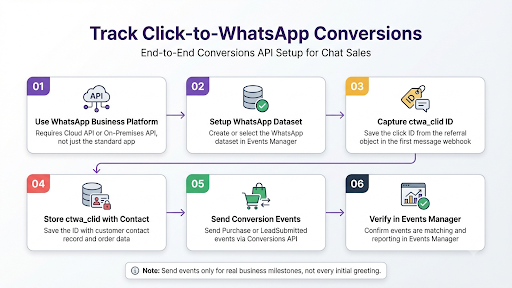
You track them by capturing the ctwa_clid from the first message, saving it with the customer, and sending a Purchase or LeadSubmitted event with that ID to your WhatsApp dataset when the conversion happens. Here’s the full flow.
- Connect your number to the WhatsApp Business Platform. Use Cloud API directly or through a Meta Business Partner. Make sure the WhatsApp Business Account sits in the same business portfolio as your ad account and Facebook Page.
- Create or find your dataset. Meta’s guide uses the WhatsApp Business Account ID to create a dataset through the Dataset API. If one already exists for the account, the call returns its ID. The business owns this dataset.
- Grant the right permissions. A developer app needs advanced access to whatsapp_business_management and whatsapp_business_manage_events, plus Ads Management Standard Access. If you use a partner, they handle most of this.
- Capture the ctwa_clid. Read it from the referral object on the first inbound message from an ad click. Store it on the contact record and carry it into your CRM or order system.
- Define your conversion moments. Decide what counts. For example, LeadSubmitted when the customer shares their details, QualifiedLead when sales confirms fit, and Purchase when payment clears.
- Send events in real time. Post each event to your dataset with action_source: business_messaging, messaging_channel: whatsapp, the ctwa_clid, and for purchases, the currency and value.
- Verify in Events Manager. Open the dataset and confirm events are arriving without errors before you judge the campaign.
- Add the conversion columns in Ads Manager. Once events flow in, customize your columns to show purchases, cost per purchase, and purchase value next to your messaging metrics.
Pro Tip! Don’t send an event for every “Hi” or “Price?” message. If you report every chat as a lead, you’re just teaching Meta to find more chatters. Send events only for real milestones, so the algorithm learns what a good customer looks like.
Can Meta Detect WhatsApp Leads and Purchases Automatically?
Partly. Meta offers Automatic Events for WhatsApp on the Business Platform. According to Meta’s developer documentation, it analyzes new chat threads that start from CTWA ads and flags likely LeadSubmitted or Purchase events, which your system can then report through the Conversions API. Existing customers can turn it on in Meta Business Suite under Settings, then Accounts, then WhatsApp accounts, in the “Privacy and data sharing” section.
There are limits. Meta says the feature isn’t available to businesses in the EU, UK, Japan, or South Korea. It’s also a detection tool, not a replacement for your own sales data, so a confirmed payment from your CRM is still the stronger signal.
Which Campaign Objective Should You Use to Optimize for WhatsApp Sales?
Use the Sales objective with WhatsApp as the conversion location if you want Meta to optimize for purchases. Meta’s Conversions API guide states that CAPI events give Click-to-WhatsApp ads access to purchase optimization. Without those events, Meta can only optimize for conversations.
| Objective | What Meta optimizes for | Best for |
| Engagement (WhatsApp) | Conversations started | Testing creatives and building chat volume |
| Leads (where WhatsApp is available) | Mainly conversations | Lead-focused businesses, if your account shows this option |
| Sales (WhatsApp) | Conversations, or purchases once CAPI events are flowing | Stores and service businesses that close sales in chat |
Important Point to be Considered! Purchase optimization needs a steady flow of events to learn. A campaign with only a couple of tracked sales per week will struggle. Start by optimizing for conversations, get your events flowing, and switch once you have enough purchase volume.
What Should You Do If You Can’t Use the Conversions API Yet?
If you’re on the WhatsApp Business app or don’t have developer help, you can still measure results. It just won’t feed Meta’s optimization.
- Use a unique pre-filled message per ad. Set the ad’s greeting to something like “Hi, I saw the winter sale ad.” When the chat arrives, you know which ad sent it.
- Label chats by source. Tag every ad-driven chat and every chat that turns into an order. Then compare orders to spend each week.
- Track orders in one place. If you take orders inside the app, our guide on fixing a missing order management tab in WhatsApp Business helps you keep order records tidy.
- Calculate cost per sale manually. Divide ad spend by closed orders from ad-tagged chats. It’s rough, but it’s far better than judging success by chat count.
Pro Tip! Be careful with the “WhatsApp button click” custom conversion trick some advertisers use. A website button click only means someone tapped a link. It doesn’t mean they messaged you or bought anything, and it can fire for traffic that didn’t come from Meta at all.
Why Are You Getting Clicks but No WhatsApp Messages?
If people click but few chats start, the problem is usually before tracking even matters. The click opens WhatsApp, but the person doesn’t press send.
Check these common causes:
- No pre-filled message. An empty chat box makes people hesitate. A ready-to-send line removes that friction.
- The ad itself is failing. If the ad shows an error or won’t publish, see our fix for the Click-to-WhatsApp ads “Something went wrong” error.
- The number has issues. If your number is limited or flagged, chats may never reach you. Our guide on “This account is not allowed to use WhatsApp” errors covers the common causes.
- Accidental taps. Some placements bring more low-intent clicks. Review results by placement and cut the weak ones.
How Can You Tell if WhatsApp Conversion Tracking Is Working Correctly?
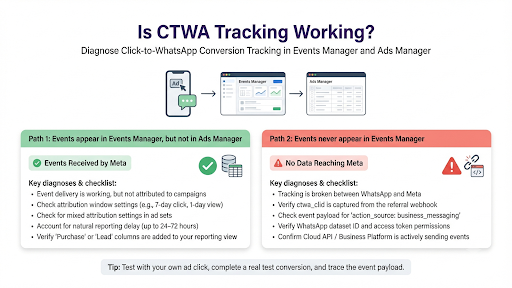
Tracking is working when every closed sale from an ad chat appears in Events Manager with a ctwa_clid, and Ads Manager starts showing purchases against the right ads. Use this checklist:
- Click your own ad from a test phone and send the pre-filled message.
- Confirm your system saved a ctwa_clid on that contact.
- Mark a test conversion and send the event.
- Check Events Manager for the event under your WhatsApp dataset, with no errors.
- Watch Ads Manager over the next day for the event to show up in your conversion columns.
If events appear in Events Manager but not in Ads Manager, look at attribution windows and mixed attribution settings first. If events never reach Events Manager, the problem is in your payload, permissions, or dataset connection.
What Mistakes Break Click-to-WhatsApp Attribution?
- Losing the click ID during agent handoff. Store the ctwa_clid on the contact, not just in the bot session. Teams that move chats between systems should also read our guide on moving chat history from the WhatsApp Business API to the app, since switching setups can break that link.
- Sending the purchase value in the wrong currency, or leaving the value out entirely, which makes ROAS meaningless.
- Counting every chat as a lead. This inflates results and trains Meta on the wrong people.
- Using a dataset owned by a different business. The dataset, ad account, Page, and WhatsApp Business Account should live in the same business portfolio, or be properly shared.
- Judging the campaign in the first few days before late sales have had time to close and be reported.
- Breaking lead capture inside the chat. If you collect details with WhatsApp Flows and the form won’t open, leads never get recorded. See our fix for WhatsApp Business Flows forms not loading.
Frequently Asked Questions
Does the Meta Pixel work with Click-to-WhatsApp ads at all?
Only if a webpage sits between the ad and the chat. If your ad sends people to a landing page with a WhatsApp button, the pixel can record the page view and button tap. But that path adds a step, and the actual sale in chat still needs to be sent through the Conversions API to be counted.
How long does it take for WhatsApp conversions to appear in Ads Manager?
Events sent through the Conversions API usually show in Events Manager soon after they’re received, but Ads Manager reporting can lag behind. Meta also notes that newly launched ads may need time before metrics show. Give it at least a day before deciding something is broken.
Can I track WhatsApp conversions without a developer?
Yes, usually through a Meta Business Partner or WhatsApp platform that has a built-in Conversions API connection. Many let you mark a chat as a lead or a sale with a click, and they send the event with the ctwa_clid for you. Check that the tool supports the events you need before you sign up.
Why does Ads Manager show conversions from chats that didn’t come from my ads?
This usually happens when you track a website “WhatsApp button click” as a custom conversion. That event fires for any visitor who taps the button, including organic or direct traffic, and Meta may still credit it under its attribution rules. Tracking chat outcomes with the ctwa_clid avoids this, because the ID only exists when the chat started from an ad.
Can I use WhatsApp conversion data to build audiences?
Yes. Once purchase and lead events are flowing into your dataset, you can use them to build custom and lookalike audiences in Ads Manager, the same way you would with website events. This helps you find more people who resemble your actual buyers, not just your chatters.
Do I need Meta Verified to track Click-to-WhatsApp conversions?
No. Meta Verified is a paid subscription for a verified badge and account protection features, and it isn’t required for the Conversions API. What you do need is the WhatsApp Business Platform, a dataset, and the correct permissions.
Final Recommendation
If your Click-to-WhatsApp ads show chats but no conversions, stop treating “Messaging conversations started” as your success metric. It tells you people were curious, not that they bought.
Here’s what to do next, based on your setup:
- On the WhatsApp Business Platform: Capture the ctwa_clid, send Purchase and LeadSubmitted events through the Conversions API, verify them in Events Manager, and then move to the Sales objective once you have steady purchase volume.
- Using a partner tool: Turn on its Meta Conversions API connection and map your “lead” and “sale” labels to Meta’s supported event names.
- On the WhatsApp Business app: Use unique pre-filled messages and chat labels to track sales by ad for now, and plan a move to the Platform when your ad spend makes optimization worth it.
Fix the data first, and the campaign optimization follows. Meta can only find more buyers once you tell it who your buyers are.
