


If you made your ads inside the WhatsApp Business app, you can usually check and appeal a restricted ad or ad account right inside the app, with no Facebook account needed. If the restriction sits on a WhatsApp Business Platform (API) account, an ad account in Ads Manager, or a whole business portfolio, the appeal goes through Meta Business Support Home. You never have to post anything on Facebook, but you do need a Meta login that has admin access to that asset.
The hard part is figuring out which one you have. Appeal in the wrong place and nothing happens. This guide shows you how to spot your exact restriction, where to send the appeal, what to write, and what to do if the “Request review” button is missing.
Quick Overview
| What you see | What is actually restricted | Where to appeal | Facebook account needed? |
| “Your account is restricted right now” in the WhatsApp Business app | Temporary limit on starting new chats | No appeal. It lifts when the timer in the app ends | No |
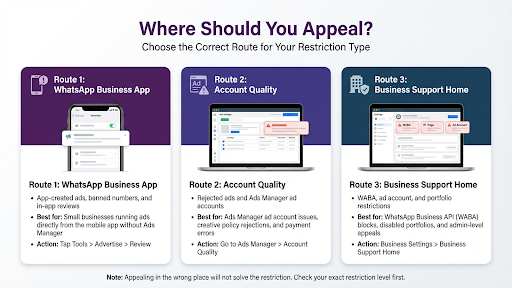
| Ad rejected or ad account restricted, and the ad was made in the WhatsApp Business app | The ad or the ad account WhatsApp created for you | The Advertise section inside the WhatsApp Business app | No |
| “This account is not allowed to use WhatsApp” or a ban screen | Your WhatsApp Business phone number | The Request review button on the ban screen | No |
| Ad account restricted in Ads Manager or Business Settings | A Meta ad account inside a business portfolio | Account Quality or Business Support Home | You need a Meta login with admin access |
| WhatsApp Manager says the account is restricted or disabled | A WhatsApp Business Account (WABA) on the API | Business Support Home | You need a Meta login with admin access |
What Does “WhatsApp Business Ad Account Restricted” Actually Mean?
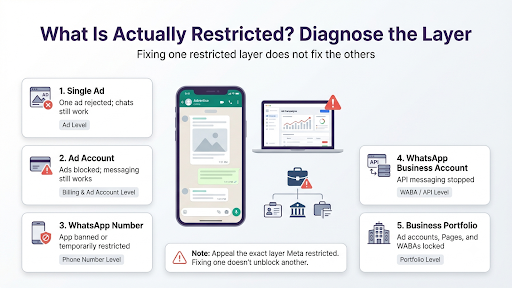
It means Meta has blocked one specific layer of your setup, and each layer has its own appeal path. People often say “my WhatsApp Business ad account is restricted” when the real problem is one of these five things:
- A single ad: One Click-to-WhatsApp ad was rejected. Your other ads and your chats are fine.
- The ad account: You can’t run any ads, but your WhatsApp number still sends and receives messages.
- The WhatsApp number: The WhatsApp Business app itself is banned or temporarily restricted.
- The WhatsApp Business Account (WABA): API messaging through a provider or the Cloud API has stopped.
- The business portfolio: Everything under it is locked, including ad accounts, Pages, and every WABA.
Here is the quick test. If you can still chat with customers but can’t boost or advertise, it’s an ad or ad account issue. If you can’t message anyone, it’s a number or WABA issue. If every Meta tool shows a warning, it’s the portfolio.
Important Point to be Considered! Fixing one layer does not fix the others. A restored ad account will not unban a phone number, and an approved number review will not unlock a restricted portfolio.
Can You Appeal a WhatsApp Business Restriction Without a Facebook Account?
Yes, in most WhatsApp Business app cases. Since 2023, Meta has let WhatsApp Business app users create Facebook and Instagram ads that click to WhatsApp without a Facebook account, using only an email address and a payment method. Ads made that way are managed, and reviewed, from inside the app.
Things change when your ads or WhatsApp account live in a Meta business portfolio. Business Support Home and Account Quality run on Meta’s business tools, so you have to sign in with a login that has admin access to that portfolio. That can be a Facebook profile you never post from. Some businesses can also sign in to Meta Business Suite with Instagram credentials, but that option depends on how your assets were set up, so don’t count on it.
One rule catches a lot of people off guard. WhatsApp’s own help center says that ads created outside the WhatsApp Business app can’t be edited, paused, or deleted in WhatsApp. If someone set up your ad in Ads Manager, you’ll have to appeal there with the Facebook account that has permission for the ad.
How Do You Appeal a Restricted Ad or Ad Account Inside the WhatsApp Business App?
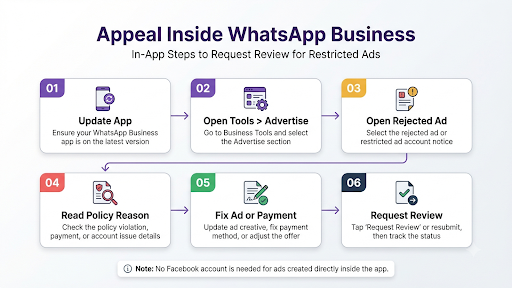
Open the Advertise section in the WhatsApp Business app, find the ad or ad account notice, and tap the review option if Meta offers one. Labels can differ slightly by app version and country, but the flow usually looks like this:
- Update the WhatsApp Business app to the latest version from the App Store or Google Play.
- Open the app and tap Tools, then Advertise. On some versions, tap More options (three dots), then Advertise.
- Tap the ad marked as rejected, or open Ad account settings if the whole account shows a warning.
- Read the reason Meta gives. It usually names the ad policy or payment problem involved.
- Fix the issue first. For a rejected ad, change the image, text, or offer that broke the policy.
- Tap Request review if it shows up. For a single rejected ad, editing and resubmitting it often works just as well.
- Check back in the Advertise section for the result.
Pro Tip! If you get asked to switch accounts when you open an ad, that ad isn’t linked to the WhatsApp number you’re using now. Open WhatsApp Business on the number that created the ad, then appeal from there.
If you see “Something went wrong” while creating or reviewing an ad, sort that out before you appeal. Our guide on the Click-to-WhatsApp ads “Something went wrong” error walks through the usual fixes.
What if the ad account is restricted because of a payment problem?
Fix the payment method before you do anything else. A failed charge, an expired card, or an outstanding balance can restrict an ad account even when your ads follow every policy. In the WhatsApp Business app, go to Advertise, then More options, then Ad account settings, then Ad payments. From there you can update the card or tap Get payment support.
How Do You Request a Review for a Banned WhatsApp Business Number?
Tap Request review on the ban screen in the WhatsApp Business app. This doesn’t need Facebook, Meta Business Suite, or any other login.
- Open the WhatsApp Business app on the banned number.
- On the ban or restriction notice, tap Request review.
- Enter your business name, what you sell, and how customers usually reach you.
- Explain why you think the ban is a mistake, or what you’ve already changed.
- Submit once and check the app for an update.
If there’s no review button at all, WhatsApp is usually telling you the decision is final for that number. You can still go to Settings, then Help, then Contact us to ask a question, but that rarely reverses a ban.
If your message says the number isn’t allowed to use WhatsApp at all, read our breakdown of the “This account is not allowed to use WhatsApp Business” error. It covers what that wording means and what you can still do.
What Should You Do If WhatsApp Business Says “Your Account Is Restricted Right Now”?
Wait it out. This is a temporary limit, not a ban. WhatsApp’s help center says you don’t need to take any action when you see “Your account is restricted right now” or “Your account may be restricted soon.”
While the restriction is on, you usually can’t start new chats or add people to groups. You can still reply to existing chats. The app shows how long it will last, and it often lasts about 24 hours.
- Stop sending messages to people who haven’t saved your number or messaged you first.
- Pause broadcast lists and bulk forwards.
- Keep answering customers who already started a chat with you.
- Don’t reinstall the app or switch phones to “reset” the timer. That doesn’t work.
Important Point to be Considered! Repeated restrictions are a warning sign. If you keep hitting this limit after messaging Click-to-WhatsApp ad leads, the next step can be a full ban.
How Do You Appeal Through Meta Business Support Home?
Sign in to Meta Business Suite as an admin of the business portfolio, open Business Support Home, choose the restricted asset, and click Request review. Use this route for API accounts, ad accounts in Ads Manager, and restricted portfolios. Meta’s WhatsApp Business Platform policy enforcement documentation describes the same flow.
- Sign in to business.facebook.com with the login that has admin access to the portfolio.
- Click All tools, then Business Support Home.
- Click Account overview (the speedometer icon) if it doesn’t open on its own.
- Select the restricted asset. This might be the ad account, the WhatsApp Business Account, or the portfolio.
- Pick the violation you want to dispute and click Request review.
- Finish any verification Meta asks for, such as a phone code, a selfie video, or an ID photo.
- Add your supporting details and click Submit. The case then moves to the In review tab.
On the API side, you can also start from WhatsApp Manager. Find the phone number with the warning, click View details in Business Support Home, and look under Available for review.
Pro Tip! Only admins can request a review. If you have employee access, the button may be greyed out or missing. Ask the portfolio owner to give you admin access, or have them file the appeal.
Running the same number on both the app and the Cloud API? Restrictions can show up differently on each side. See how that setup works in our guide to using the WhatsApp Business app and Cloud API on the same number.
How Do You Appeal a Rejected Click-to-WhatsApp Ad?
Go to Account Quality while signed in to the ad account, select the rejected ad, and click Request review if it’s available. That’s the flow WhatsApp lists in its best practices for keeping WhatsApp ads running. If you made the ad in the WhatsApp Business app, open it from Advertise instead.
Before you appeal a rejected ad, check these common triggers:
- Before-and-after images or claims about personal traits (“Are you overweight?”)
- Restricted products such as alcohol, supplements, financial services, or anything banned under the WhatsApp Commerce Policy
- Too-good-to-be-true offers, fake countdown timers, or misleading prices
- A landing experience that doesn’t match the ad, such as an ad that promises a discount the chat never offers
Often you’ll get approved faster by editing and resubmitting the ad than by arguing for the original version.
What Should You Write in Your Appeal?
Keep it short, factual, and specific. Meta’s reviewers want three things: who you are, how you use WhatsApp, and what you fixed. Here is a simple template you can adapt:
“Hello, we are [Business name], a [type of business] based in [city, state]. Our website is [URL]. We use WhatsApp to reply to customers who message us first from our website, store, and Click-to-WhatsApp ads. We do not buy contact lists or send bulk messages to people who haven’t opted in. We believe this restriction was applied by mistake. [If you changed something: We have since removed X and updated Y.] Please review our account. Thank you.”
- Do include your WABA ID or ad account ID for API and Ads Manager appeals.
- Do mention how customers opt in, such as a website form, checkout checkbox, or ad click.
- Don’t write in all caps, threaten legal action, or paste the same message several times.
- Don’t submit several appeals for the same violation. Duplicates don’t speed things up.
How Long Does a WhatsApp Business or Meta Ad Account Review Take?
Most reviews come back within 24 to 48 hours, but some take a week or longer. Meta doesn’t publish a guaranteed timeline. Business messaging partners commonly report 24 to 48 hours for Business Support Home reviews, and app reviews often come back within a day.
Your account stays restricted while the review is pending. When the decision arrives, Business Support Home or the app shows whether the violation was overturned or kept.
Why Did My WhatsApp Business Ad Account Get Restricted?
Most restrictions come from automated systems that flag patterns, not from a person reading your chats. The most common triggers are:
- Messaging people who didn’t opt in. Many blocks or reports in a short time quickly lowers your quality rating.
- Uploading contact lists in bulk. Messaging a large imported list is one of the fastest ways to get flagged. Read more on why WhatsApp Business gets banned after importing contacts.
- Using unofficial apps. Modded apps, auto-senders, and unofficial “bulk WhatsApp” tools break the terms of service.
- Breaking ad or commerce policies. Selling restricted products or making misleading claims in ads.
- Payment problems. Failed charges, mismatched billing details, or a card that other restricted accounts have used.
- Brand or name problems. A business name that looks like someone else’s brand. See our guide on WhatsApp Business display names rejected for trademark reasons.
- Brand-new accounts with risk signals. Some portfolios get restricted the same day they’re created, often because of shared devices, VPNs, or links to previously restricted accounts.
What If “Request Review” Is Not Showing or Your Appeal Was Rejected?
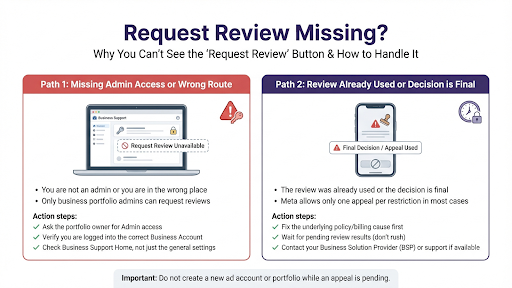
A missing review button usually means the decision can’t be appealed again, or that you don’t have admin rights to appeal it. Work through these checks in order:
- Confirm your role. In Business Settings, check that you’re an admin of the portfolio, not an employee.
- Check you’re in the right place. App bans are appealed in the app. API and ad account restrictions are appealed in Business Support Home. Sending an app appeal for a WABA problem gets you nowhere.
- Look for a used-up review. Many violations allow only one review. Once the decision is kept, the button often disappears.
- Ask your Business Solution Provider. If you use the API through a BSP, they can sometimes escalate through partner support after your own review fails or sits pending for more than 48 hours.
- Look at paid support options. Meta Verified for business includes access to account support in supported regions. If it isn’t showing for you, our guide on the WhatsApp Business Meta Verified waitlist not being available explains why.
Important Point to be Considered! Don’t pay anyone who promises a “guaranteed unban.” No third party can override Meta’s decision, and handing over your login can get your remaining assets restricted too.
Common Mistakes That Make a Restriction Worse
- Opening a new ad account or portfolio right away. Meta links new accounts to restricted ones through devices, payment methods, and admins. This often spreads the restriction.
- Appealing before fixing the cause. If the flagged ad or messaging habit is still live, the review will most likely be denied.
- Switching numbers to keep messaging the same list. The new number can get flagged even faster.
- Deleting and reinstalling the app. A ban or restriction is tied to the number, not the phone.
- Giving vague answers. “We did nothing wrong” with no business details is easy to deny.
How Can You Avoid WhatsApp Business Ad Restrictions in the Future?
Message only people who chose to hear from you, and keep your ads honest and specific. A few habits make a big difference:
- Get clear opt-in on lead forms, checkout pages, and websites before you message anyone.
- Reply fast to people who click your ads, but don’t chase leads who never answer.
- Keep an eye on your quality rating in WhatsApp Manager if you use the API.
- Read the WhatsApp Business Messaging Policy before running a new kind of campaign.
- Use one payment method, one portfolio, and a small, stable group of admins.
Once your ads are running again, check that leads are being counted correctly. If they aren’t, our guide on Click-to-WhatsApp ads not tracking conversions can help.
FAQs
Can I create a new WhatsApp Business ad account if mine is restricted?
You can try, but it often makes things worse. Meta can connect a new ad account to the restricted one through your number, payment card, or device. Then the new account gets restricted too, and your original appeal may be harder to win.
Does a restricted ad account stop my WhatsApp Business chats?
No, not by itself. An ad account restriction blocks advertising only. Your number keeps working unless the WhatsApp account itself or the whole business portfolio is restricted.
Is there a way to override a WhatsApp Business ban?
No. The only official routes are the in-app review and Business Support Home. Tools or services that claim to “override” or “bypass” a ban break WhatsApp’s terms, and they can lead to a permanent ban.
Can someone else appeal my WhatsApp Business restriction for me?
For the app, the review has to come from the banned number. For API and ad account restrictions, any admin of the business portfolio can file it, including an agency partner you’ve given admin access.
Why was my business portfolio restricted the same day I created it?
New portfolios are checked automatically, and signals such as a VPN, a shared device, or a payment card used on other accounts can set off an instant restriction. Request a review once, complete any ID or business verification Meta asks for, and avoid creating another portfolio while you wait.
Will a WhatsApp Business ban also affect my Cloud API account on the same number?
It can. App and API enforcement are separate systems, but they’re tied to the same phone number and business. A serious violation on one side can lead to action on the other, so fix the cause on both.
Final Recommendation
Start by finding out what’s actually restricted: a single ad, the ad account, the number, the WABA, or the portfolio. If you built your ads inside the WhatsApp Business app, handle everything from the Advertise section and the in-app review. You don’t need Facebook for any of it. If the warning shows up in Ads Manager, WhatsApp Manager, or Business Settings, sign in as an admin and file one clear, factual appeal in Business Support Home. Fix the cause first, submit once, and give Meta a few days before you escalate through your BSP or a support option.
