


If your WhatsApp Business Meta Verified subscription shows “Pending” after you paid, the two usual reasons are that your payment is still clearing as a temporary bank hold, or Meta is still reviewing your business details. Neither one means your money is lost or your account is in trouble.
Most payment holds clear on their own once the charge is processed. Reviews can take longer, especially if your business name or profile details don’t match what Meta expects. Below, you’ll learn how to tell which problem you have, what to check first, and when it’s time to contact Meta support.
Quick Overview
- Payment pending: Usually a temporary authorization hold from your bank, card issuer, or app store. It should drop off once the payment is processed.
- Verification pending: Meta is reviewing your business name, profile, or documents. This runs separately from billing.
- Plan change pending: Plan updates typically take effect within 24 hours.
- Check first: Your bank or app store statement, the Meta Verified screen in the WhatsApp Business app, and any in-app notices asking for more information.
- Still stuck? Open the WhatsApp Business app and go to Tools > Meta Verified > Enhanced Support, or contact your app store if it’s a billing hold.
What Does “Pending” Mean After You Pay for Meta Verified?
“Pending” means Meta hasn’t finished processing your subscription yet. The word shows up in two different places, and they mean different things.
| Where you see “Pending” | What it usually means | What to do |
| Bank, card, or app store statement | A temporary authorization hold, not a final charge | Wait for it to post or drop off, then check again |
| Meta Verified screen in WhatsApp Business | Meta is reviewing your business or account details | Look for requests for info, fix mismatches, and wait for the review |
| Plan or subscription change | An upgrade or plan change is being applied | Give it about 24 hours before troubleshooting |
Figuring out which one you’re dealing with saves a lot of wasted effort. A billing hold won’t be fixed by editing your business profile, and a review won’t speed up because you retry the payment.
Why Is My Meta Verified Payment Showing as Pending?
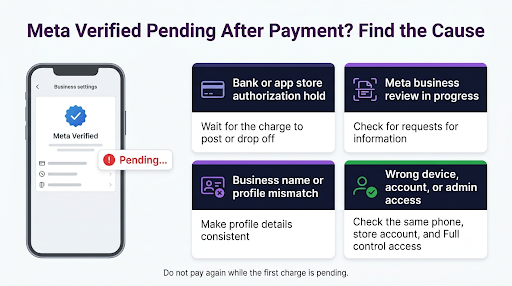
A pending payment is most often an authorization hold. Your bank or card issuer reserves the amount while the transaction is confirmed. According to Meta’s own guidance on troubleshooting Meta Verified payment issues, a “Pending” status is likely an authorization hold from your financial institution, and it should be removed once the payment is processed.
Other common payment-side reasons include:
- App store processing delays: If you subscribed through the Apple App Store or Google Play, the store handles the charge first and then passes it to Meta.
- Bank security checks: Some banks hold or block subscription charges from new merchants until you approve them.
- Card problems: An expired card, a card that doesn’t support recurring payments, or insufficient funds can leave a charge stuck.
- Duplicate attempts: Tapping “Subscribe” more than once can create several holds. Usually only one turns into a real charge.
Tip: Meta Verified subscribers are charged once a month on the date they signed up. If you see two charges in the same month, check whether one is still marked “Pending.” That one is often just a hold that will disappear.
Why Is My Meta Verified Status Pending Even Though the Payment Went Through?
If the charge has cleared but the subscription still says “Pending,” Meta is most likely reviewing your account. Payment and verification are separate steps. Paying doesn’t automatically mean you pass the review.
Here’s what Meta typically checks, and where things go wrong:
- Business name mismatch: The name on your WhatsApp Business profile should match the name on your documents and other business details. Small differences like “Joe’s Bakery” vs. “Joe’s Bakery LLC” can slow things down.
- Incomplete profile: Meta’s eligibility rules include having a profile name and profile picture set up.
- Account activity: Your account needs to have been on the WhatsApp Business app for a certain number of days and to have sent messages recently.
- Country availability: Meta Verified for WhatsApp Business is only offered in certain countries. Availability can change, so check inside the app.
- Extra information requests: Meta may ask for documents or a confirmation step. If you miss the prompt, the review just sits there.
Missed prompts are more common than people think. If WhatsApp alerts aren’t reaching you, fix that first. This guide on WhatsApp Business notifications not working walks through the settings that usually block them.
How Long Does a Pending Meta Verified Subscription Take?
It depends on what’s pending. Plan changes usually take effect within 24 hours. Payment holds normally clear within a few business days, depending on your bank or app store.
Business reviews can take longer. Meta business verification through Business Settings may take up to 14 business days, and users on Reddit and other forums report waits that run past that window. Reviews can stretch if Meta asks for more details or if your information doesn’t match.
A reasonable rule of thumb:
- Under 24 hours: Wait. This is normal.
- 1 to 3 days: Check your statement and the Meta Verified screen for any notices.
- More than 3 to 5 days with a cleared charge and no request for info: Contact support.
How Do You Fix a Meta Verified Subscription Stuck on Pending?
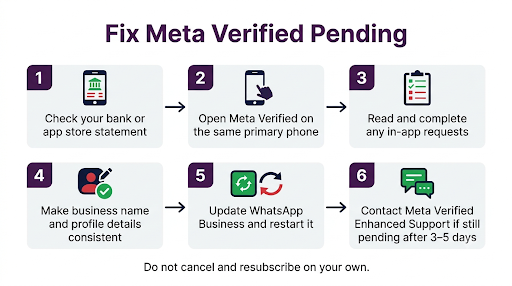
Work through these steps in order. Each one rules out a common cause before you move to the next.
1. Confirm the charge actually cleared
Open your banking app or card statement. Check whether the Meta charge is “Pending” or “Posted.” If you paid through an app store, check your purchase history:
- iPhone: Settings > your name > Media & Purchases > View Account > Purchase History
- Android: Google Play Store > profile icon > Payments & subscriptions > Budget & history
If the charge is still a hold, there’s nothing to fix on the WhatsApp side yet.
2. Check you’re on the same device and account
Make sure you’re checking on the same phone, the same app store account, and the same WhatsApp Business number you used to subscribe. Meta notes that plan changes and adding Facebook or Instagram assets are done on mobile devices only. A subscription bought on one phone won’t always show correctly on another.
3. Open the Meta Verified screen and read every notice
In the WhatsApp Business app, go to Tools (or Settings, depending on your version) and tap Meta Verified. Look for banners asking you to confirm details, upload a document, or update your profile. Complete anything listed there.
4. Fix profile and name mismatches
Compare your business name, profile picture, and other details with what you submitted. Make them consistent. Be careful here, though. Changing your business name or key details after subscribing can trigger a new review, so only edit what’s actually wrong.
5. Update the app and restart it
An outdated WhatsApp Business app can show an old status. Update it from the App Store or Google Play, close it fully, and reopen it. Don’t uninstall the app as a first step. If you do need to reinstall, make sure your chats are backed up. If your backups keep failing, see this fix for WhatsApp Business backup not working before you remove anything.
6. Don’t pay again
It’s tempting to retry when you see “Pending.” Usually it just stacks up more holds on your card. Wait for the first transaction to settle.
7. Contact Meta Verified support
If the charge has cleared and the status hasn’t changed after a few days, reach out. In the WhatsApp Business app on your primary device, tap Tools > Meta Verified > Enhanced Support. You can also use the Meta Business Help Center to troubleshoot Meta Verified business subscriptions. Include screenshots of the status, the charge, and the date you subscribed.
If the issue is clearly a billing hold that never cleared, contact your bank or the app store you paid through instead. They control the hold, not Meta.
Can Linking Facebook or Instagram Affect a Pending Subscription?
Yes, it can. Meta’s help center warns that linking a Facebook or Instagram account to a WhatsApp Business account with an active Meta Verified subscription may cancel that subscription in some cases. So avoid linking or unlinking accounts while your status is still pending.
If you already have Meta Verified on Instagram and want it on WhatsApp too, follow the proper steps. This guide on how to transfer Meta Verified from Instagram to WhatsApp Business explains what carries over and what doesn’t.
What If Meta Verified Isn’t Even an Option Anymore?
Sometimes the pending status clears, but the Meta Verified option disappears or shows a waitlist. That usually points to eligibility or regional availability, not your payment. If that’s what you’re seeing, check this explainer on the Meta Verified waitlist not being available on WhatsApp Business.
What Happens After the Subscription Goes Active?
Once your subscription is active, you should see the verified badge and get access to the benefits in your plan. According to WhatsApp’s Meta Verified overview, the badge can appear in chats, your business profile, the Calls tab, and incoming calls. Higher plans add features like a custom web page and enhanced support.
A couple of things can still go wrong after activation:
- Customers can’t see the badge or your profile: This can be a caching or visibility issue. See the fix for a WhatsApp Business profile not showing to customers.
- Impersonation protection isn’t working: This feature is part of the subscription but doesn’t always kick in right away. Here’s what to check when WhatsApp Business impersonation protection is not working.
Common Mistakes That Keep the Status Pending Longer
- Paying multiple times because the first attempt looked stuck.
- Editing your business name repeatedly during the review, which can restart it.
- Checking on a different device or app store account than the one used to buy.
- Ignoring in-app prompts for documents or confirmation.
- Using a card that blocks recurring charges, such as some prepaid or virtual cards.
- Contacting the wrong team. Bank holds go to your bank or app store. Review delays go to Meta.
Could Other Meta Account Problems Be Involved?
Sometimes. If your business also runs ads, a restriction on your Meta ad account or business portfolio can make reviews slower or block certain features. If you’ve received a restriction notice, handle it first. This guide covers the WhatsApp Business ad account restricted appeal process.
Related ad tools can show their own errors around the same time, which can be confusing. If you’re seeing ad issues alongside the pending subscription, check these separately: Click-to-WhatsApp ads “Something went wrong” error and Click-to-WhatsApp ads not tracking conversions. They usually have different causes than a Meta Verified billing hold.
The same goes for WhatsApp Flows. A form that won’t load is a separate issue, and the steps for WhatsApp Business Flows form not loading won’t affect your subscription status.
FAQs
Will I get a refund if my Meta Verified subscription stays pending?
If the charge was only an authorization hold, it should be released automatically and you won’t need a refund. If you were actually charged and the subscription never activated, ask for a refund through the app store you used or through Meta Verified support, depending on where you paid.
Why was I charged twice for Meta Verified on WhatsApp Business?
Often one of the charges is just a pending hold that will drop off. Compare your Meta Verified payment history in the app with your bank statement. If both charges have posted, contact support with screenshots of each transaction.
Can I use WhatsApp Business normally while Meta Verified is pending?
Yes. You can keep messaging customers, using your catalog, and running quick replies as usual. You just won’t have the verified badge or the paid subscription features until it’s active.
Does a pending Meta Verified status mean my application was rejected?
No. Pending means the process isn’t finished. If Meta rejects your application, you’ll typically see a notice explaining why, such as a name mismatch or an unmet eligibility rule.
Should I cancel and resubscribe if it’s stuck?
Usually not. Canceling can create another review cycle and more charges. Try support first. Only cancel and resubscribe if Meta support tells you to.
Is there a phone number for Meta Verified WhatsApp Business support?
WhatsApp Business support runs through in-app help rather than a public phone line. As a subscriber, your fastest route is Enhanced Support inside the Meta Verified section of the app.
Final Recommendation
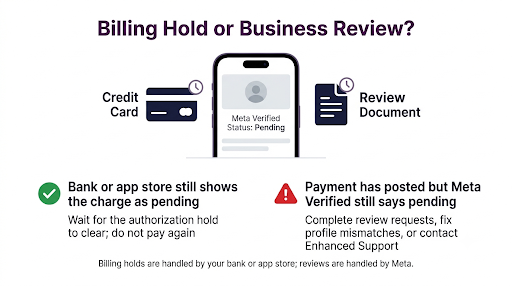
Start by figuring out whether your “Pending” status is a billing hold or a business review. If your bank or app store still shows the charge as pending, wait a few business days and don’t pay again. If the charge has cleared, open the Meta Verified screen, complete any requests, and make sure your business name and profile are consistent. Still stuck after three to five days with a cleared payment? Go to Tools > Meta Verified > Enhanced Support in the WhatsApp Business app and send Meta your screenshots. That’s the quickest way to get a real answer.
